
NotaryAssist® Software



Your complete business at your fingertips.
Unlock Your Notary Potential with NotaryAssist – Your All-In-One Solution for Professional Notaries Nationwide. Streamline Your Business with Customizable Services, Real-Time Analytics, and User-Friendly Tools. Elevate Productivity and Growth with Integrated Accounting, Bookkeeping, and Cutting-Edge SEO. Experience the Ultimate One-Stop Solution – Join NotaryAssist Today!
Business Center
Discover the game-changing power of NotaryAssist’s all-new Business Center, where Professional Notaries can effortlessly track ALL their services! From Loan Signings to Estate Planning, to Hospital appointments, and beyond – customize unique revenue streams to fit your market & expertise. NotaryAssist not only suggests services but also empowers you to create your own, including specialties like Process Serving, Permit Running, and Field Inspections. Seize control of your success and unlock endless possibilities with NotaryAssist today!
>Analytics
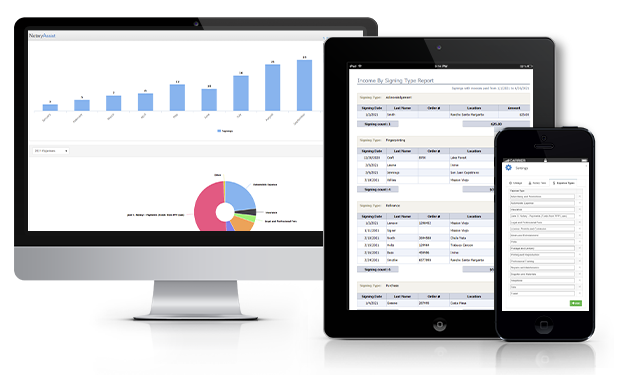
Unleash the Power of Real-Time Analytics with NotaryAssist! Discover trends, cost insights, and profitability for each service – all at your fingertips. Watch your data come to life with easy-to-read graphs and leverage this valuable information to market yourself and make informed decisions that will optimize your notary business. Take control of your success and elevate your notary services to new heights with NotaryAssist today!
>Auto Import
Discover the Best Time Saving Feature in the Industry – NotaryAssist's Auto Import! This revolutionary engine lets you forward ANY confirmation email for automatic import into your NotaryAssist account. Say goodbye to manual data entry and hello to efficiency – it's like having a virtual assistant! Since release, it has successfully imported thousands of different confirmation emails and continues to grow. Save time, streamline your workflow, and boost productivity with NotaryAssist's Auto Import today!
>Calendar
Easily enter and organize your appointment schedule. You can push your appointment details to your smartphone calendar via Goggle Calendar or ICal, so you always know when you are available to accept work. Need driving directions? No problem, get turn by turn navigation with a single click displayed on your mobile device.
>Notarial Acts
Maximize your Tax Benefit! As a Notary Public, you are a Public Servant. This qualifies YOU for special Tax Exemptions! Each Notarial Act you preform has a state allowable fee. This allowable fee is Self-Employment Tax exempt. NotaryAssist helps you track your Notarial Acts and the allowable fees to gain Maximum Tax Benefits. Each tax situation is different so we advise discussing your personal situation with a licensed tax professional.
>Reporting
NotaryAssist offers a variety of professional reports to see the health of your business! Each report features a customizable date range allowing reporting by the day, week, month, quarter, or year! Income, Profit & Loss, Expense, Mileage, and Tax reports are just a few of our ever growing reporting abilities.
>The Ultimate Organizational Tool
- Professional Notaries must stay organized. Our customers choose NotaryAssist because it includes everything to organize your business, all in one, easy-to-use application!
- Your customers, calendar, directions, expenses, mileage, invoices, and reports are with you at all times, no matter what device you use…Smartphone, laptop, or PC! Enter your data one time and have access to it from any device anytime without ever having to re-enter.
- NotaryAssist is ready whenever and wherever you are! We are excited to announce our Mobile App is coming soon! For both Apple and Android!!
Our Stats
Managing your
business so you can
focus on growing it!
Pricing Plan
Monthly
- Assignment Information
- Auto Mileage Calculator
- Business and Tax Reports
- Automatic Updates
- Customer Manager
- Schedule Manager
- Business Expenses
- Account Invoices
- Driving Directions
- Built-in Security
Annual
- Assignment Information
- Auto Mileage Calculator
- Business and Tax Reports
- Automatic Updates
- Customer Manager
- Schedule Manager
- Business Expenses
- Account Invoices
- Driving Directions
- Built-in Security
Storage Only
- Recommended for Retired Notaries
- Data Safely Stored
- View & Print Only
- Built-In Security
- Low Annual Price

Frequently Asked Questions

NotaryAssist will help organize your busy Notary business. You can track customers, income, what you are owed, who owes you, expenses, mileage and more from one easy to use application. NotaryAssist is different than other accounting and business software programs, it tracks Notary specific data points and tax information, helping professional Notaries maximize their income. NotaryAssist focuses on the management of your business so that you can focus on growing it!
LavaTurtle Software Inc. launched NotaryAssist in 2007 and is currently providing service to thousands of customers across the United States. LavaTurtle Software Inc. will continue to support, design, and develop software for the Notary industry.
There are 3 available payment plans, along with our marketing platform. Monthly, Annually, and Storage Only. You chose what works best for your personal business. Monthly cost is $8.99, Annually cost is $95.00, Storage Only $50.00 per Year, and Marketing at $59.99/Month
Yes, our NotaryAssist Mobile Apps are available for both Apple and Android please visit your App Store or Google Play store to download or you can click the links located at the top of our website.
Technical Support Services – Our Customer Service Staff is available by Phone, Text, and Email. LIVE in-person Phone Support is offered M – F 8:00am to 5:00pm PST. Tech Support phone number is 949-713-3570 Email Support is available - Support@NotaryAssist.com Email and Text Support are monitored regularly during and after regular business hours. We work to respond quickly to all questions, and in most cases respond within 24 hours or less.